HTML Text Editors: While we try to learn html, need text editor. To begin coding HTML you need 1st things: a simple text editor and after need a web browser to show your coding result. There are many editors available online, like Sublime, VSC, Notepad++ etc.
HTML Text Editors
- Since HTML files are text files, we can use any text editor to create HTML files.
- We must write our code in a text editor in order to generate a web page since text editors are tools that enable modification of written text.
- While there are many other kinds of text editors that you may download right away, Notepad (Windows) or TextEdit (Mac) are the finest options for a beginners.
- Notepad and the Sublime Text Editor will be used in our lesson. Here are a few quick tutorials on using Notepad and Sublime Text to make your first webpage.
- You may easily utilize other professional text editors, such as Notepad++, Sublime Text, Vim, VS Code, etc., after you understand the fundamentals.
- We believe that using a simple text editor is a good way to learn HTML.
- Follow the steps below to create your first web page with Notepad or TextEdit.
A. HTML Code With Notepad
Notepad is an easy-to-use text editor that’s perfect for those just learning HTML. You may easily access it from any Windows version that has it accessible. It is available almost in all vesion of windows.
You can access the Notepad in windows by 2 ways.
- Searching from strat program menu
- With right click menu in any folder or main screen slect New then Text Document
Step 1 A: Open Notepad (Window)
Windows 8 or later:
Open the Start Menu (the window symbol at the bottom left on your screen). Type Notepad in search bar.

Windows 7 or earlier:
Open Start > Programs > Accessories > Notepad
Step 1 B: Open TextEdit (Mac)
Open Finder > Applications > TextEdit
Also change some preferences to get the application to save files correctly. In Preferences > Format > choose “Plain Text”
Then under “Open and Save”, check the box that says “Display HTML files as HTML code instead of formatted text”.
Then open a new document to place the code.
Step 2: Write Some HTML in Notepad
Write or copy the following HTML code into Notepad:
<!DOCTYPE html>
<html lang="en">
<head>
<title>Code Guide Pro - Try it Editor</title>
</head>
<body>
<h2>This is a Heading</h2>
<p>Hello World!</p>
</body>
</html>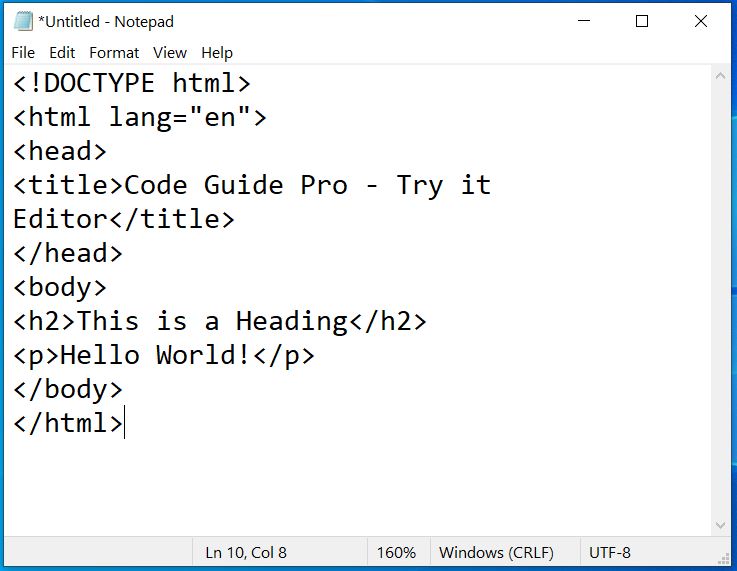
Step 3: Save the HTML File With .htm or .html Extension.
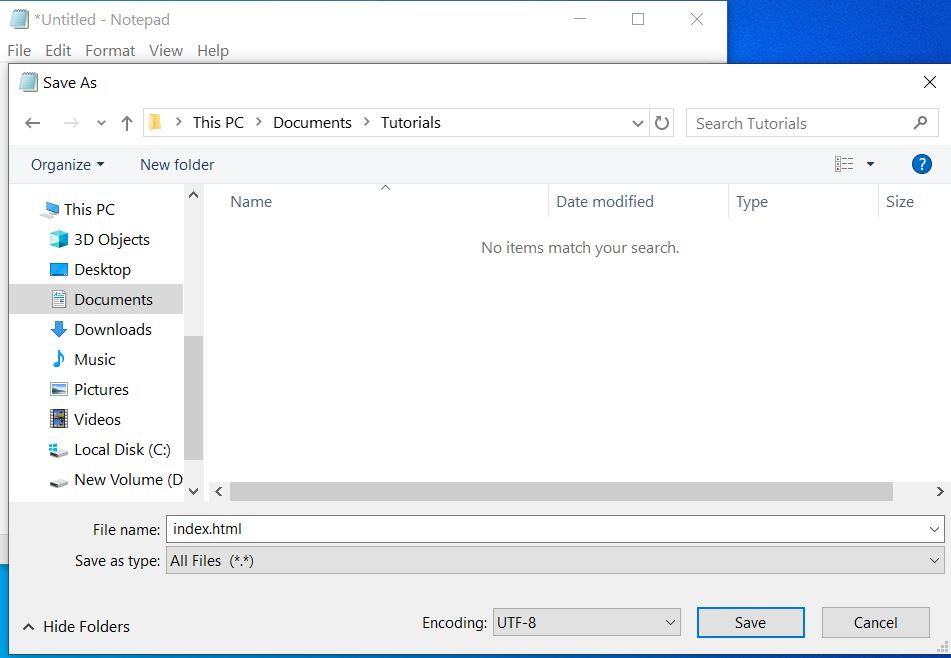
To save the file on your computer do File > Save As… on Notepad menu.
Give the name to this file “index.htm” or “index.html” (There is no difference; it is up to you.) and set the encoding to UTF-8 (which is the preferred encoding for HTML files). Select all files then press save button.
Step 4: Open the HTML Page in Your Browser
To open your saved html or htm file from the computer go to the folder location where you save it just before and then either double-click on file or click on open with mouse right button minu option.
The result will look much like this:

Once you get familier with code editing, you can use other editors like Sublime or VSC
Anjum Tips Online Editor
With our free online editor, you can edit the HTML code and view the result in your browser quickly.
It is the perfect tool when you want to test code fast. It also has color coding and the ability to download, save and share code with others:
<!DOCTYPE>
<html>
<head>
<title>Web page title</title>
</head>
<body>
<h1>Write Your First Heading</h1>
<p>Write Your First Paragraph.</p>
</body>
</html> To see how it work, Click on the “Try it Yourself” button. See the result and test yourself with some code modifying html text editor online.